Wear OS
A calorie tracker for Wear OS watches
Check calories and macros left, log a meal by speaking or typing, and keep BiteCheck on your watch face with the Wear OS app.
What you can do
BiteCheck for Android includes a Wear OS app. It shows today's calories left and your protein, carbs, and fat, lets you log a meal by speaking or typing a short description or by repeating a recent meal, and adds a calorie complication to your watch face.
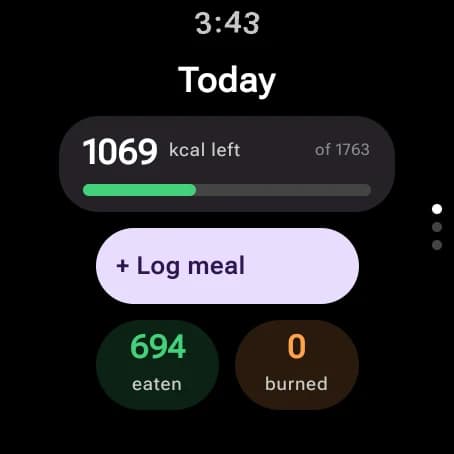
Today at a glance
See calories left, eaten, and burned, then swipe to protein, carbohydrates, and fat against your goals. The numbers come from the same diary as your phone.
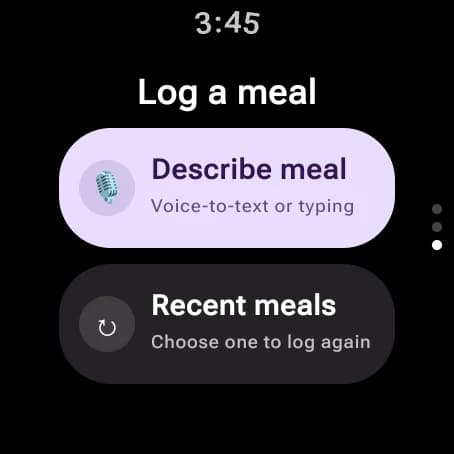
Log a meal from your wrist
Tap Log meal, then speak or type what you ate—for example, "grilled chicken with rice". BiteCheck analyzes the description and adds the meal to your day, ready to adjust on your phone later.
Ate the same breakfast again? Pick it from Recent meals and log it in one tap.
On your watch face
Add the BiteCheck complication to a watch face to see calories left without opening the app.
Install BiteCheck on your Android phone from Google Play and sign in; the watch app uses the same account.
See BiteCheck in action
See how BiteCheck helps you capture a meal, check the nutrition details, and follow your progress.
Frequently asked questions
Does BiteCheck have a Wear OS app?
Yes. BiteCheck for Android includes a Wear OS app with today's calories and macros, meal logging by voice or text, and a watch-face complication.
Can I log meals by voice on my watch?
Yes. Tap Log meal and describe what you ate by speaking or typing; BiteCheck analyzes it and logs it to your day.
Keep exploring BiteCheck
See BiteCheck's features, plans, and supported devices, or learn how meal estimates work across photo, voice, text, chat, and barcode logging.